Google Antigravity puts two kinds of choices in the same model picker. Gemini 4 Neon, Argon, and Hydrogen are standalone models. Orchestrator (Neon) and Orchestrator (Argon) split the work between two models. A standalone model handles planning, implementation, and verification for the main agent. In Orchestrator, the model in parentheses plans and reviews, and Hydrogen implements. Both modes can read code, edit files, and run tests.
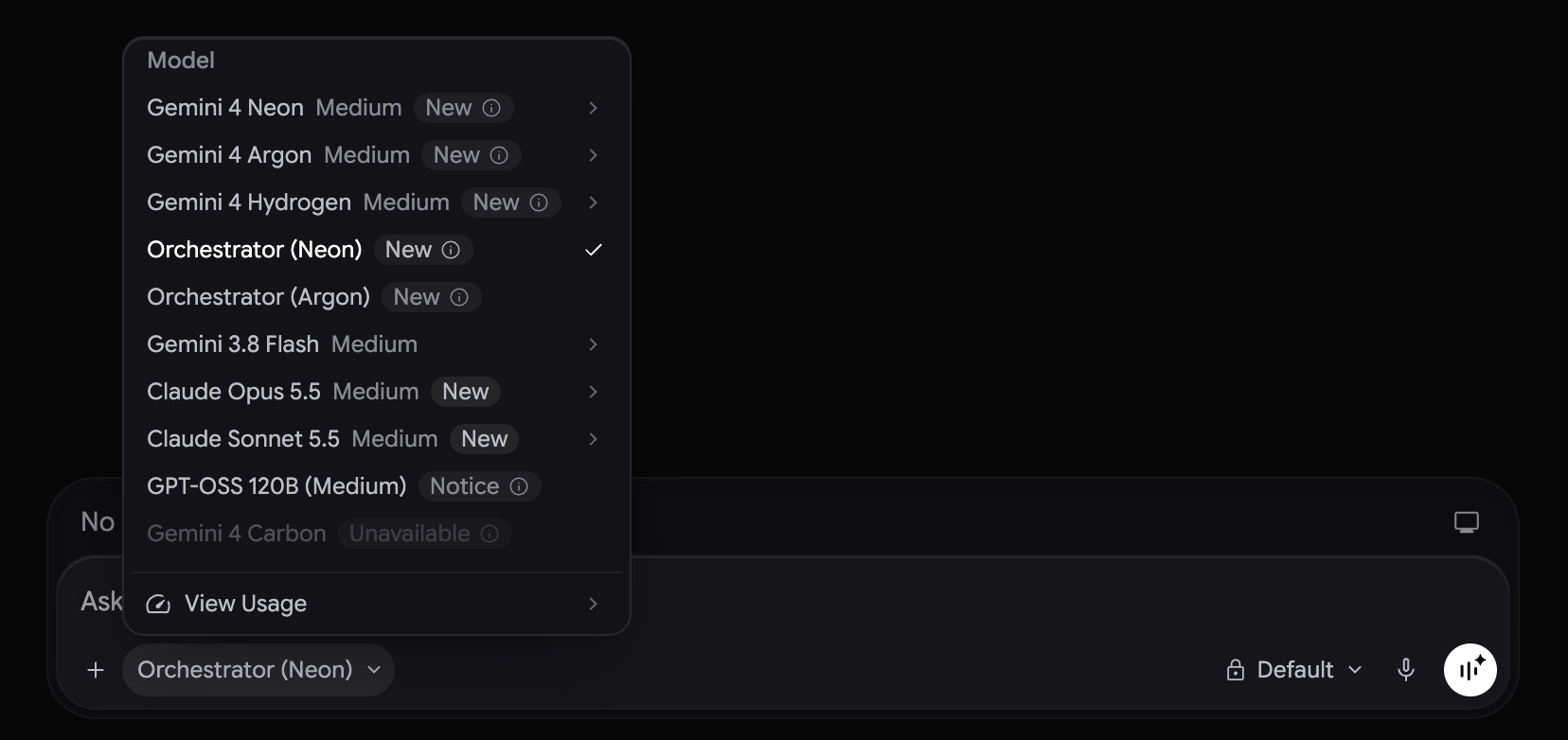
Five options at a glance
| Picker option | Planning and implementation | Thinking levels | When to use it |
|---|---|---|---|
| Gemini 4 Neon | Neon throughout | Low / Medium / High / Extra | Day-to-day features and refactors, including edits that require ongoing interface or compatibility decisions |
| Gemini 4 Argon | Argon throughout | Low / Medium / High | Reasoning-intensive work: tracing an intermittent failure, analyzing concurrent behavior, or comparing designs across modules |
| Gemini 4 Hydrogen | Hydrogen throughout | Low / Medium / High / Extra | Fast iteration on a clear task: add unit tests, write a conversion script, or apply a settled change |
| Orchestrator (Neon) | Neon plans and reviews; Hydrogen implements | Fixed | A clear goal with several steps: locate callers, make coordinated edits, and run regression tests |
| Orchestrator (Argon) | Argon plans and reviews; Hydrogen implements | Fixed | Have Argon map cross-module dependencies and sequence a migration, then have Hydrogen apply the plan |
In the Antigravity setup shown above, Neon, Argon, and Hydrogen all default to Medium. You can select High manually, and Neon and Hydrogen also offer Extra (xhigh in the CLI). A higher setting gives the model more reasoning budget. If what’s missing is a reproduction or acceptance criteria, supply those before changing the setting.
How the standalone models compare
Google positions Neon for demanding coding work you do regularly, Argon for tasks that call for sustained reasoning, and Hydrogen for fast execution and iteration. Hydrogen can handle multi-file work on its own when the scope and checks are clear. Argon is worth trying when the job calls for testing several competing explanations, regardless of how many files are involved.
The table uses High results from Artificial Analysis for all three models. Terminal-Bench 4.0 tests whether a model can complete tasks in a terminal; FrontierCode-AA 2.0 tests coding ability. The last column measures inference time per task across the full Artificial Analysis suite. It does not average the two scores’ test runtimes or predict how long a change will take in Antigravity.
| Model (High) | Terminal-Bench 4.0 | FrontierCode-AA 2.0 | Time per task across the suite |
|---|---|---|---|
| Neon | 61.6% | 43.3% | 14.8 min |
| Argon | 57.1% | 25.7% | 29.8 min |
| Hydrogen | 54.0% | 36.3% | 8.6 min |
These results support starting with Neon for everyday work. Argon scores above Hydrogen on the terminal benchmark and below it on the coding benchmark. For a difficult investigation, judge a switch to Argon by whether it explains the symptoms, rules out alternatives, and proposes checks you can run.
What happens during an Orchestrator handoff
The planner starts each turn by exploring the repository in read-only mode. It establishes the scope of the change, how to verify it, and when to revisit the plan. Hydrogen then edits files and runs builds and tests. If an interface behaves differently from the plan or verification repeatedly fails, Hydrogen can hand control back to the planner for a revised approach. The planner also reviews progress and results on longer tasks. For a question or a read-only review, the planner can answer directly without a handoff.
The two presets change the planner and keep the same implementation model. The handoff happens within one agent and one conversation. For separate agents working in parallel, Antigravity offers features such as /swarm. There is no Orchestrator (Hydrogen) preset in the current picker; Hydrogen fills the implementation role in the available presets.
Choosing a mode for a configuration migration
- The change is settled. Replace a key in sample configurations, docs, and test fixtures. Even if that touches several files, start with Hydrogen. Check that the old name is gone from the intended scope and run the relevant tests.
- The goal is clear, but the scope needs mapping. Add a new key and keep the old one working for one release. Try Orchestrator (Neon) to find where config parsing, help text, and tests must change, then implement the coordinated edits.
- The compatibility rules are still open. The old and new keys can conflict, and values can come from a command-line flag, the environment, or a configuration file. Start with standalone Neon or Argon to trace current behavior and produce a precedence table and tests that distinguish the options. If you want Argon to sequence the cross-module migration once the rules are settled, use Orchestrator (Argon) for that stage.
To compare the two presets, give them the same starting commit and acceptance criteria. Check the plans for missed callers and regression cases before comparing completion times. With Hydrogen implementing in both presets, the useful question is which planner resolved the problems that mattered.
Availability, context, and quota
The Antigravity model matrix, checked on November 19, 2026, lists all five options for paid Google AI Pro and Ultra subscribers. Ultra also includes Gemini 4 Carbon and Orchestrator (Carbon), which uses Hydrogen for implementation as well. Trial and enterprise access follow different rules.
Antigravity documents a context window of up to 512K tokens for Neon. Specs from other products don’t establish what Antigravity makes available. Check View Usage in the model picker or in Settings for your subscription quota; API token prices don’t tell you your remaining quota.
Sources:
- Choose a model (Google Antigravity, accessed November 19, 2026)
- Gemini 4 Neon in Google Antigravity (Google Antigravity, November 18, 2026)
- Gemini 4 Hydrogen and Orchestrator (Google Antigravity, November 12, 2026)
- Gemini 4 Argon in Google Antigravity (Google Antigravity, October 13, 2026)
- Plans (Google Antigravity, accessed November 19, 2026)
- Gemini 4 Neon vs Gemini 4 Hydrogen (Artificial Analysis, accessed November 19, 2026)
- Gemini 4 Hydrogen vs Gemini 4 Argon (Artificial Analysis, accessed November 19, 2026)
Author: Cyber Herald
Original URL: https://torchtree.com/en/post/gemini-4-antigravity-model-guide/
Publish Date: 2026-11-19
Last Updated: 2026-11-19
License: CC BY-NC-SA 4.0