Craft Agents is a desktop application developed and open-sourced by the Craft.do (Lukilabs) team, positioned as “Agent-Native Software”: it designs its interface from scratch around how AI agents work, rather than bolting AI onto existing tools. The project was released in early 2026 under the Apache 2.0 license and had gained more than 5,300 GitHub stars by the end of April 2026.
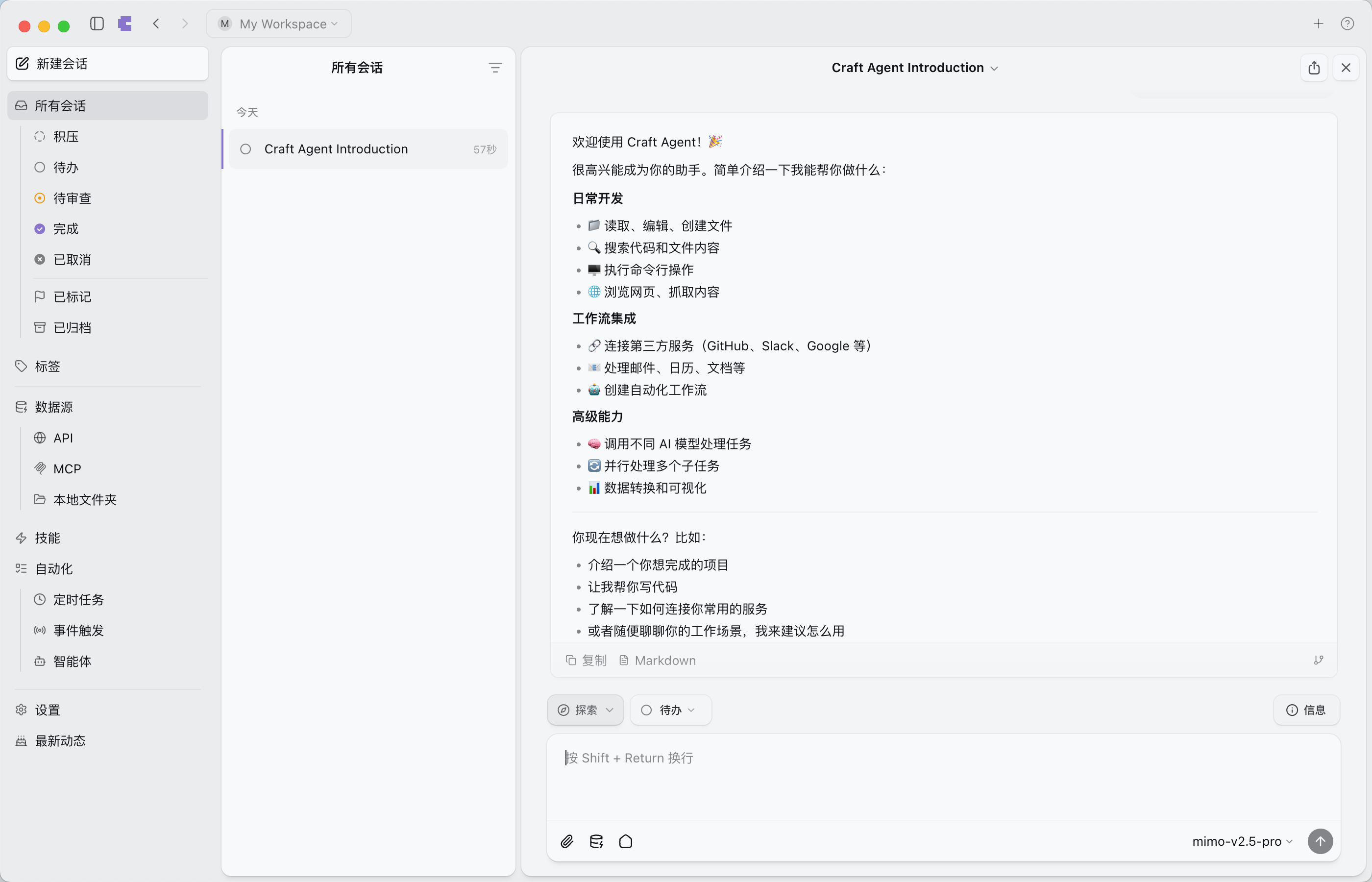
Core Positioning: Document-Native, Not Terminal or IDE
Today’s mainstream agent tools broadly fall into two categories: terminal-native CLI tools (such as Claude Code) and IDE-integrated solutions (such as Cursor). Craft Agents takes a different path: a standalone desktop app centered on documents.
The Craft.do team wrote on their official blog that their motivation for building the product was “a desire for a better, more opinionated way to work with the world’s most powerful agents.” Its interface borrows interaction logic from email clients and task managers: sessions are presented as documents, support custom status flows (Todo → In Progress → Needs Review → Done), and let users switch between multiple tasks without losing context.
This design choice means Craft Agents’ target users aren’t limited to developers. Non-technical roles such as product managers, operations staff, and designers can interact with agents through natural language, without learning terminal commands or understanding IDE workflows.
Natural-Language Configuration: Removing Integration Friction
Craft Agents’ most distinctive feature is how it configures data sources. Users simply describe what they need in natural language, and the agent automatically handles the rest.
For example, to connect Linear, a user types “Add Linear as a data source,” and the agent automatically finds Linear’s public APIs and MCP servers, reads the relevant documentation, obtains credentials, and completes the configuration — no manually editing config files or going through OAuth flows.
The mechanism supports multiple integration methods:
- MCP Server: paste existing MCP config JSON and the agent handles it automatically
- Local MCP: supports stdio-based subprocesses, including npx, Python scripts, and any local binary
- REST API: paste an OpenAPI spec, endpoint URLs, or even screenshots of documentation, and the agent parses them itself
- No-API scenarios: a built-in Chromium browser can sign into websites directly and operate them
The Craft.do team offered a concrete example on their blog: “We even connected it to a private PostgreSQL database sitting behind a jump host.”
Model Routing: Dual-Backend Architecture Supporting 400+ Models
Craft Agents’ model support is implemented through a unified routing layer with a dual-backend architecture:
- Claude Agent SDK: handles Anthropic-family models, with support for custom base URLs
- Pi SDK: handles Google AI (Gemini), OpenAI (Codex), GitHub Copilot, and others
Directly supported providers include Anthropic, OpenAI, Google AI Studio, and GitHub Copilot. Through third-party gateways and custom endpoints, this extends to OpenRouter, Vercel AI Gateway, Ollama, LM Studio, DeepSeek, and more — covering 400+ models in total. Users can set different default models per workspace, or switch models mid-session without changing their workflow.
Worth noting: version v0.8.10 added a message gateway feature with Telegram and WhatsApp integration, offering three response modes (progress, streaming, final_only). v0.8.12 added DeepSeek as a natively supported Pi backend provider and defaults to GPT-5.5.
Three Execution Modes and Permission Control
Craft Agents offers three execution modes, switchable quickly with Shift+Tab:
| Mode | Behavior | Best For |
|---|---|---|
| Explore | Read-only; the agent only researches and analyzes | Safe exploration, information gathering |
| Ask to Edit | Every action requires user confirmation | Building trust, sensitive operations |
| Execute | Fully autonomous execution | Mature, trusted workflows |
Each mode maps to a different permission level, and users choose as needed. In addition, each data source can have independent read / write / execute permissions for fine-grained access control.
Skills System and Claude Code Migration
Craft Agents has a built-in Skills system that lets users define reusable agent instruction templates. Skills are created the same way — in natural language: describe what the skill should do, and the agent implements it. To use one, invoke it with @skill-name, no app restart needed.
For users already familiar with Claude Code, Craft Agents supports importing Claude Code Skills directly. This design lowers the migration cost and reflects the Craft.do team’s accommodating stance toward the existing ecosystem.
Bootstrapped Development: Building Craft Agents with Craft Agents
The Craft.do team claims they “built Craft Agents entirely with Craft Agents, without using any code editor.” The claim sparked discussion in the open-source community. If true, it means the tool already supports a complete software development lifecycle — and also that its current capability ceiling is bounded by the agent’s own skill level.
The project is built in TypeScript (90.4%) on the Electron framework. Installation supports one-command scripts (curl on macOS/Linux, PowerShell on Windows), or building from source.
Comparison with Mainstream Tools
| Dimension | Craft Agents | Claude Code | Cursor |
|---|---|---|---|
| Form | Standalone desktop app | CLI / VS Code extension | VS Code fork |
| Interface philosophy | Document-centric | Terminal/code-centric | IDE-centric |
| Model flexibility | 400+ models, switch anytime | Anthropic only | Multi-model but IDE-bound |
| Configuration | Natural language | Config files/commands | Settings panel |
| Multi-tasking | Native inbox | Single session | Mostly single session |
| License | Apache 2.0 | Closed source | Closed source |
| Non-developer friendly | High | Low | Medium |
As the comparison shows, Craft Agents’ core differentiation lies in “lowering the barrier to entry” and “orchestrating across tools.” It’s better suited to scenarios involving multiple SaaS tools at once and frequent model switching, rather than deep coding workflows.
Potential Concerns
As a new tool, Craft Agents also has aspects worth watching:
Ecosystem maturity. Compared to Claude Code (backed by Anthropic) and Cursor (a large user base), Craft Agents’ community size and third-party plugin ecosystem are still in the early stage.
Focus on non-coding scenarios. For pure coding-intensive tasks (large refactors, complex debugging), IDE integration may be less deep than Cursor’s. Its strengths lie more in cross-tool orchestration and non-technical user scenarios.
Electron performance. As an Electron-based desktop app, performance under long-term, large-scale use remains to be proven.
Verifiability of the bootstrapping claim. The claim that the team built the product entirely with its own tool is both proof of capability and a possible sign that some underlying functionality is bounded by the current agent’s capability ceiling.
Use-Case Assessment
| Scenario | Fit |
|---|---|
| Cross-tool orchestration (Linear + GitHub + Slack + Notion) | High |
| Non-developers using agents (PMs, operations, designers) | High |
| Research/experimentation needing frequent model switching | High |
| Running local/offline models | High |
| Pure coding-intensive development | Medium |
| Development needing deep IDE integration | Medium |
Sources
- Craft Agents official site
- Craft.do official blog: Introducing Craft Agents
- GitHub repo: lukilabs/craft-agents-oss
- Pyshine: Craft Agents OSS technical overview
- Instagit: Deep dive into multi-provider LLM routing strategy
This article is compiled from Craft Agents’ official documentation, public information in the GitHub repository, and third-party technical reviews. Product features may change with version updates.
Author: Cyber Herald
Original URL: https://torchtree.com/en/post/craft-agents-review/
Publish Date: 2026-04-30
License: CC BY-NC-SA 4.0