T3 Code (t3.codes) brings coding agent sessions scattered across separate terminal windows into a single interface. Developed by Ping Labs and released under the MIT license at pingdotgg/t3code, it works as a control plane for coding agents, handling task scheduling, status tracking, and command approvals.
Pricing and Execution Host
T3 Code is free and open source under the MIT license. It charges no subscription fee and resells no tokens. It follows a Bring Your Own Subscription (BYOS) model, using the official CLIs and API credentials already signed in on your machine. Each vendor’s usage continues to draw from your existing plan or API billing.
All execution stays on your host machine. File edits, shell commands, Git operations, and agent calls run on the local computer or remote server you designate. The desktop apps (macOS, Windows, Linux), web client, and iOS/Android mobile apps connect to that host as remote control surfaces. As long as the host stays online, you can check progress from your phone, approve a command, or turn a finished branch into a pull request.
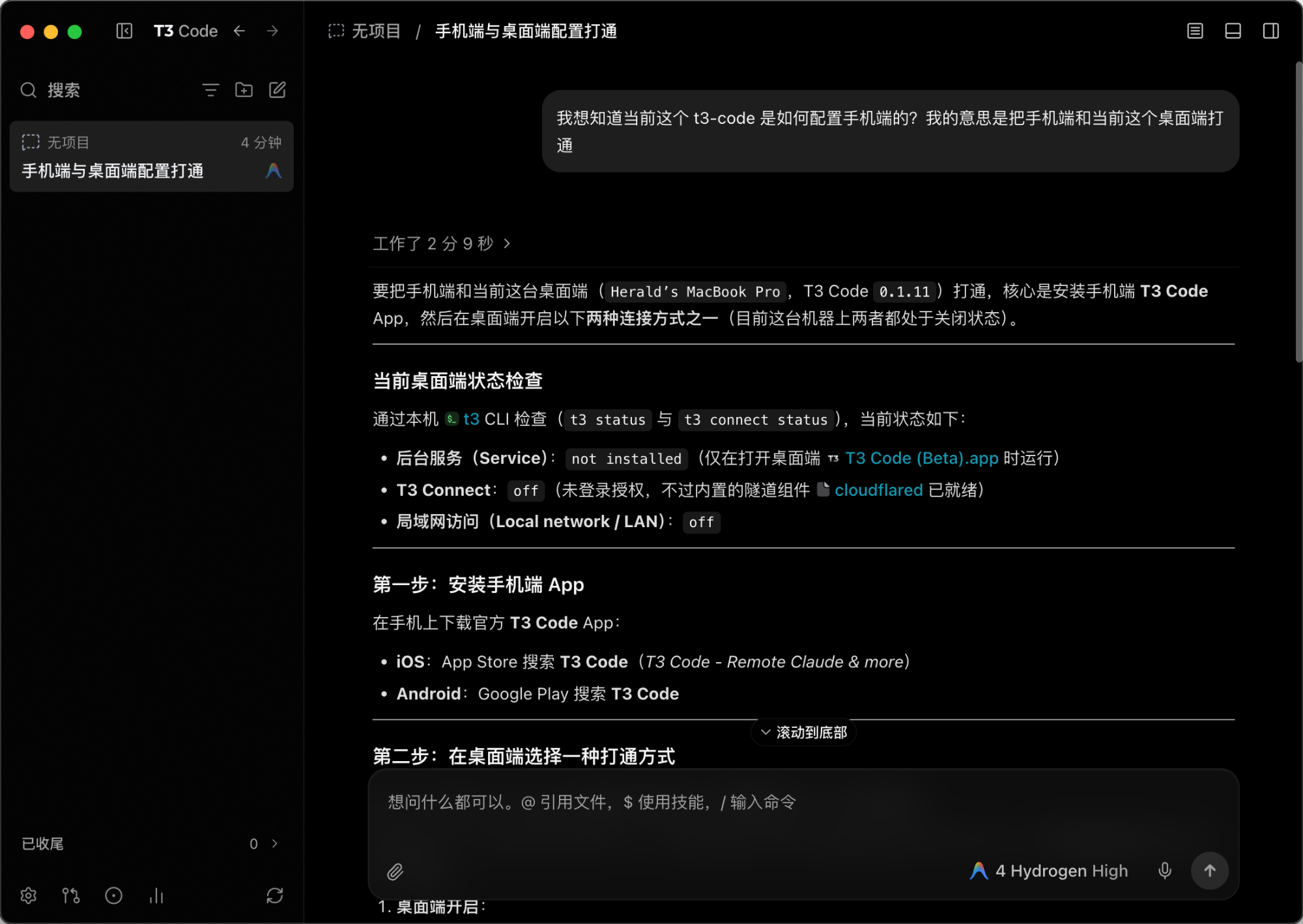
In the desktop interface, threads are grouped by project on the left, the conversation stream sits in the center, and the composer at the bottom supports @ for referencing files, $ for invoking skills, and / for slash commands, with a model selector in the bottom-right corner.
Installers are available at t3.codes, or you can install or try it from the command line:
# macOS (Homebrew)
brew install --cask t3-code

# Windows (Winget)
winget install T3Tools.T3Code

# Run without installing
npx t3@latest
Supported Agents and Multi-Model Workflows
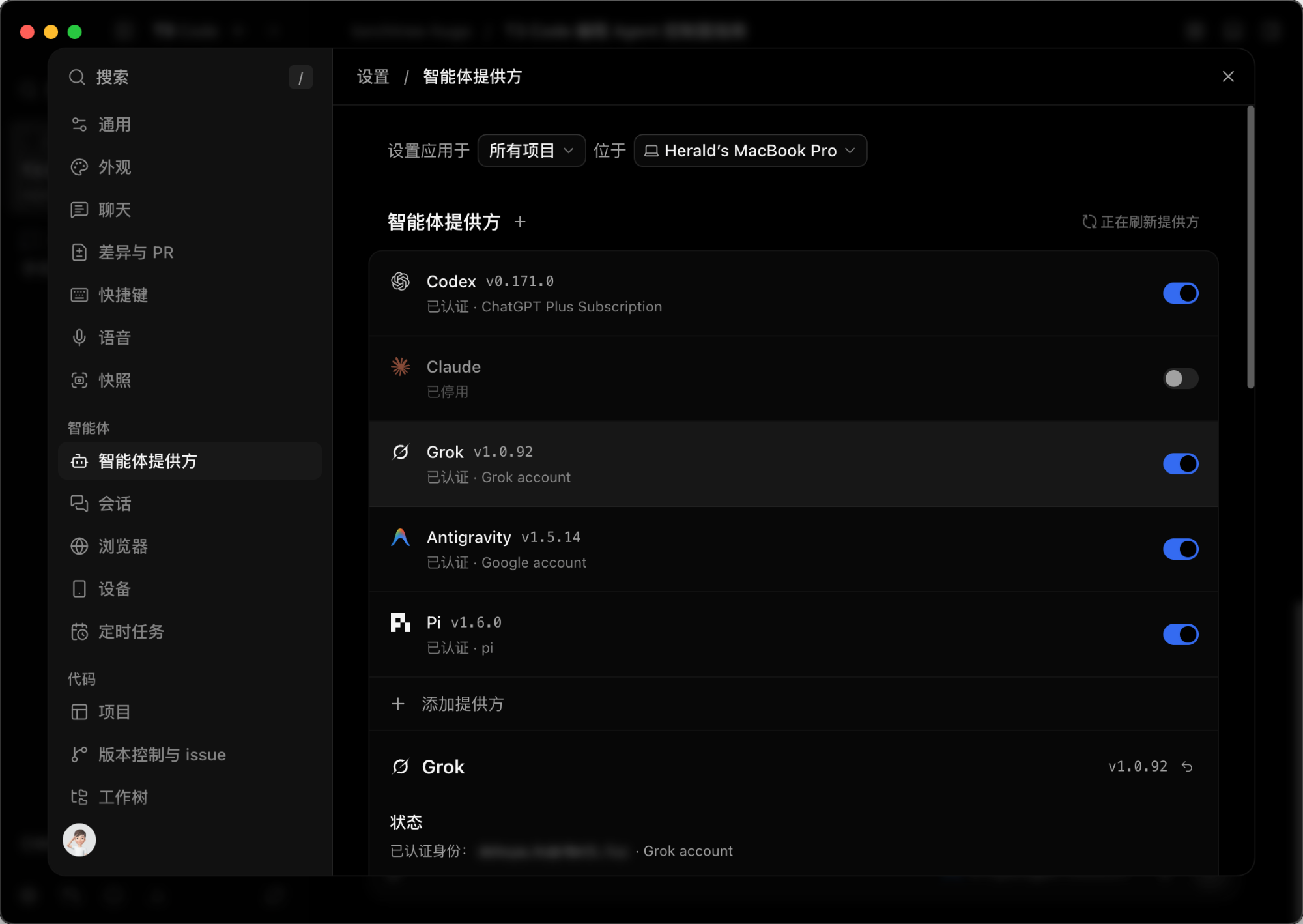
In the Agent Providers settings panel, T3 Code lists official tools already signed in on your machine, such as Codex, Claude, Grok, Antigravity, and Pi, showing each provider’s account status with a toggle to enable or disable it. It also supports OpenCode, Cursor, and tools built on the Agent Client Protocol (ACP) through registry entries or custom local commands.
Bringing multiple agents into one control plane supports several coordinated workflows:
- Switching models within one thread: Use one model to inspect code and draft an implementation plan, then switch to another model in the next turn to edit files while keeping the thread context intact.
- Task delegation and side-by-side comparison: Split work with subagent delegation (
delegate_task), or run the same prompt across multiple workspaces to compare outputs from different models. - Centralized usage tracking: View token consumption, cache savings, model distribution, estimated API-equivalent costs, and remaining session or weekly subscription quotas in one summary view.
Workspace Isolation, Permissions, and PR Guardrails
Running multiple agents on the same repository increases the chance of overlapping file edits or unintended shell commands. T3 Code addresses this with three controls.
First is Git worktrees and turn checkpoints. Parallel threads can run in separate Git worktrees rather than sharing one working directory, keeping concurrent edits isolated. Checkpoints are recorded per conversation turn so you can inspect turn-by-turn diffs or revert to an earlier message.
Second is four permission modes. Globally, per project, or per thread, you can select Supervised (manual approval required), Auto-accept edits, Auto (provider-level checks for routine actions), or Full access. This lets you require step-by-step confirmation on sensitive repositories while allowing automatic file edits in routine development, without changing CLI flags at launch.
Third is built-in previews and PR workflows. The workspace includes a file browser, per-thread terminal, browser preview pane, and mobile simulator pane for verifying UI or API changes directly. Once verified, you can commit, push, and generate PR titles, descriptions, and release notes across GitHub, GitLab, Bitbucket, Azure DevOps, Forgejo, and Gitea, including stacked PRs.
Remote Access and Operational Boundaries
If you run tasks on an office workstation or cloud server and check in later from another device, T3 Code supports LAN pairing, Tailscale, SSH, and T3 Connect (managed remote tunneling with push notifications and optional cryptographic device approval).
T3 Code fits developers who use multiple coding agent subscriptions, work across local and remote machines, or prefer reviewing diffs and approving commands in a unified UI. If you rely on a single CLI tool on one machine, the vendor’s native client is usually simpler.
Keep three constraints in mind before adopting it:
- The host must stay online: Mobile and web clients do not run models on their own; if the host sleeps, goes offline, or loses a CLI login session, remote runs stop.
- Check permission defaults early: Because the project updates frequently, default permission levels on new threads can be permissive. Verify global and per-project settings before pointing agents at production repositories.
- Respect vendor terms: T3 Code spawns official local CLI processes rather than extracting OAuth tokens for third-party requests. Personal subscriptions such as Claude Pro or Max remain subject to vendor rules on supported regions, single-user access, and reasonable concurrency; use pay-as-you-go API keys for high-frequency unattended automation.
Sources:
- T3 Code Official Website (Ping Labs, verified 2026-11-21)
- pingdotgg/t3code GitHub Repository (GitHub, verified 2026-11-21)
Author: Cyber Herald
Original URL: https://torchtree.com/en/post/t3-code-guide/
Publish Date: 2026-11-21
Last Updated: 2026-11-21
License: CC BY-NC-SA 4.0